Models
As a rule, we'll be keeping game assets as simple as possible. We want to make it easy for players to create content that fits with the art style; it's a barrier to entry if that style uses high-fidelity handmade assets.
Subject to that constraint, however, we want the game to look as good as possible, so the game will use procedural models: high-fidelity algorithmically created assets. In theory, an eight-year-old should be able to use our algorithms to make content that looks as good as the rest of the game.
Halbe's proposed algorithm for humanoids
Below we propose a method of generating a character mesh. By the fourth version, we have a humanoid body with muscle and flesh, and the tools we've used to get us there can give us clothing and armor with with little additional required functionality.
Mesh resolution
smooth_theta is a variable passed into the mesher which describes approximately the detail that it should be created at. We define it as:
The theta in radians between the surface normals of any two faces on an ostensibly round surface.
So, for example, a value of π / 8 implies that a cylinder ought to have 16 vertices in its rings.
The value of smooth_theta depends on how far away the mesh is from the camera, how large its bounding box is, and screen resolution. It should be set so that when looking at a sphere, it is difficult to see the flat polygonal edges of it against the background. This also means there is a dynamic LOD system: meshes are regenerated if the distance gets, say, close enough that the ideal smooth_theta is half the current value, or so far that it's twice the current value.
First version: collider-based
The simplest possible mesh for a character is one which conforms precisely to the shape of his bones' colliders.
Let's say each bone is a capsule. Traverse the skeletal hierarchy and generate a capsule mesh for each bone with the vertices all skinned to that bone.
Second version: distance fields and vertex weights
Next, in order to connect the bones, we convert their capsule meshes into 3D signed distance fields (SDFs). This affords two distinct advantages: it's easy to combine SDFs in a way that smooths out the joints, and for each point p on the surface, to estimate a given bone b's influence on p, we can just evaluate b's SDF (a real-valued function) on p; taking this "influence" estimate on each bone and point automatically gives us the skinning weights for all bone-on-point pairs.
With the 3D distance field capsule primitives giving us a function to place vertices onto, we now have the basis for constructive solid geometry. We place vertices and build triangles according to a modified version of advancing front.
Polar-space advancing front tree (rename to whatever you want)
Every vertex begins as a polar UV coordinate on a bone,
$$U,V\in[0,1]$$
with some arbitrary angle picked for the orientation of U = 0 (probably whatever places it at the back, assuming T-pose, like along the spine for the torso).
A bone is sort of between a capsule and a cylinder. V = 1 on a leaf bone (or V = 0 on the root bone) is always the center, like the apex of a capsule, and has no defined U. However, V = 1 on a bone which has another bone connected to its end has a defined U. There is essentially a V > 1 value due to the connection between the bones acting like a capsule, rather than a cylinder. You can think of this however you want, but essentially when two bones are 90 degrees from each other, the joint between them is still nice and spherical.
We begin at (0, 0) at the base of the pelvis and start constructing a triangle fan. The heuristic for placing vertices is based on the smooth_theta parameter, both for what V to place it at as well as what U. Once we have a fan, all of the vertices except for the apex are our advancing front.
There are two types of ways that the advancing front on a given bone handles connected bones. In the simple case, the other bone is a continuation of the shape of the current one. The relationship between the upper arm and forearm, or along spine bones, follows this pattern. In this case, the front seamlessly transitions between the bones using the pseudo-capsule method described above.
The second scenario is when you have bones that branch off of the current one. In this case, the front will essentially go around it by diverging at one of the vertices. The vertices in the gap created by this divergence are kept as a new, separate front which will be used later once the current bone or contiguous chain of bones has finished meshing (the mesher is depth-first). Eventually, the front will pass completely over the gap and the divergence will be restored, also creating a continuous ring for the new front to begin from, repeating the advancing front process.
When the front reaches the distal end of a bone with no more connected bones, it must place an apex vertex and connect the front to it with a triangle fan.
Because the front is advancing in UV space, not 3D space, an important optimization and simplification is available:
- The heuristic for placing vertices can forbid placing any vertex to the left of a neighbor to its left, in UV space, or to the right of its neighbor to the right.
- We assume that the hierarchy of bones is not self-intersecting.
- Because of this, in theory this can greatly speed up the algorithm since there's no need to test for intersections.
But what about the shoulder?
Many a plan to procedurally generate a skinned character mesh has been defeated by the most infamous of joints: the shoulder.
Essentially, our plan is to forget about trying to weight the shoulder correctly, or even do the topology correctly. Instead, after the mesh is generated (say, for example, in a T-pose), we apply an animation which lowers the arms, putting it in the worst-case scenario, but then calculate where each given vertex would be if it were placed on the surface again (as described above). Since these are distance fields, which combine in a smooth metaball-like fashion, the surface of the armpit will actually be quite a bit lower now as the arm and chest distance fields now nearly overlap.
There will no doubt need to be a lot of tweaking -- perhaps the armpit is now too low -- but this may just produce a mesh that looks more correct when the arms are down. Thus, we will save this as a morph target and animate it according to how much the upper arm bone is currently lowered. This can be done to every joint; even though none are quite as bad as the shoulder, none of them will have particularly good topology or thoughtful vertex weights1, so they may still benefit from the process.
Third version: heightmaps
This is the feature that enables characters, specifically body meshes, to actually look pretty realistic. As established, each bone has a UV semi-cylinder/semi-capsule space used for placing vertices. We can reuse this, not only as a universal space for textures, but also to apply a heightmap to the distance field which converts UV to 3D.
Each bone has a heightmap defined in its UV space. Though we've been treating bones as capsules up to this point, it is the heightmap which actually encodes the spherical curvature of the top of the head or tips of the fingers, i.e. it is the heightmap which gives a bone its "shape" and lets us stop treating it like a pure capsule. (However, it is still capsule-ish on connections between bones to avoid it looking jarring if they aren't perfectly aligned.) To actually produce these heightmaps, we can either bake them from a sculpt/scanned medical model or paint them with an in-game editor.
Halbe: I've experimented with both methods in Blender. They each work well enough.
Cruicially, we can also composite these heightmaps to produce many different character meshes. This has worked great in manual Blender experiments. Essentially, you can have a base heightmap representing a smooth, slender character, and you can add a bone layer, muscle layer, and fat layer on top of it. Each layer is both a mask for the layer below and additive with it, which makes for a pretty good approximation of how they're physically layered in the body.
Fourth version: face
We are under no illusion that a system as simple as this can handle geometry like ears, nose, eyes, etc. Even a sharp chin will be a little awkward to handle. For the face, we can just use a system similar to what Nintendo used for Miis (and reused for its recent Zelda games).
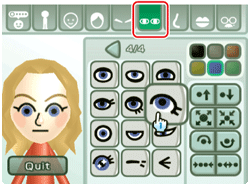
The simplest version of this doesn't even include separate meshes for the facial features; they're just textures that get overlaid onto the face.
Fifth version: clothing and armor
By now, we have a mesher with an unambiguous, universal coordinate system for the surface of the body (from the second version) and a way to encode height (from the third). We can use this same mesher to produce meshes for body-conforming equipment entirely through texture data.
The main thing we need to support this is an alpha mask which specifies where the clothing is and isn't. For instance, on a T-shirt, past (say) V = 0.3 on the upper arms, the value of this mask would go from 1 to 0. We could also use this to create holes in clothing, which the mesher would treat similarly to intersections between bones.
Once the outer surface of a clothing mesh is completed, we can use a solidify algorithm to turn it into a proper model.
Unlike in the third version, we probably wouldn't have the heightmap for clothing with respect to the surface of the skin -- otherwise, a baggy shirt on a ripped guy would have abs -- but rather with respect to a "convex-only version" of the base body mesh. That is, we would generate a version of the base body's heightmap where any concave surface is pushed outwards until it is no longer concave.
Armor is like clothing, except in the case of non-flexible material like metal plates, all vertices need to have 1.0 weight with a single bone regardless of their location. Without an extremely detailed physics simulation, this will mean lots of clipping, but this is acceptable.
-
All automated weighting techniques are mediocre, ours included. But in our approach, SDFs give us the ability to generate morph targets to refine the mediocrity. ↩